Bottom Bar#
click-repl displays a bottom bar using the PromptSession’s
bottom-toolbar feature.
It shows the current command, current parameter that require values. It helps to track which parameters still need to receive values and which do not. It presents the blue print of the current click command/group in a custom format, to show its current state of usage in the prompt.
The bottom bar displays the command’s parameters if any of them haven’t received their values.
For parameters, these are the formatting style implemented into bottom bar.
Parameters that haven’t received any values will be displayed as plain text with no special formatting.
Parameters that are currently receiving values are represented as bold, underlined text.
Parameters that have received all of its necessary values from the prompt are represented as strikethrough text.
It also keeps track of the values that an Argument with nargs > 1 has received.
 1import click
 2from click_repl import repl
 3
 4
 5@click.group(invoke_without_command=True)
 6@click.pass_context
 7def main(ctx):
 8    repl(ctx)
 9
10@main.command()
11@click.option('--student-name')
12@click.argument('marks', nargs=5, type=float)
13def get_marks(student_name, marks):
14    print(f'{student_name = }')
15    print(f'{marks = }')
16
17
18main()
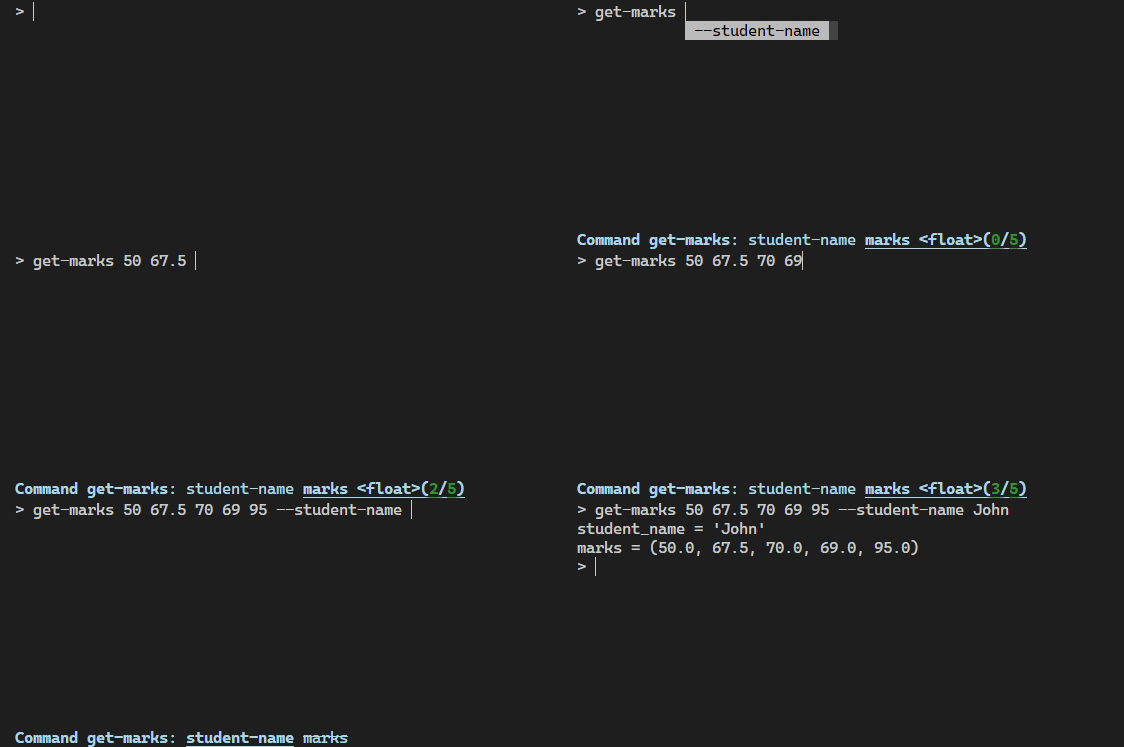
BottomBar#
This class generates text that should be displayed at the bottom bar. It returns a
Marquee object, which yields the appropriate chunk of text for each iteration to imitate
the behaviour of the <marquee> html tag, scrolling the text
left and right in the terminal screen, if it’s being overflown from the terminal window.
For more about Marquee’s behaviour, Refer to Marquee docs.
By default, The bottom bar hides the detalis of hidden command and parameters. However, when the whole name of a hidden
command is entered into the REPL, it shows the details about that command. But it still won’t show hidden parameters.
To make bottom bar display hidden parameters, set BottomBar’s
show_hidden_params argument to True.
Don’t confuse it with show_hidden_params
in ClickCompleter.
Custom BottomBar#
The BottomBar has separate methods to render the metadata about each component of
the click command and their parameters. Therefore, it’s easy to override some of its default behaviour and use your own
bottom bar implementation. Refer to BottomBar API docs to explore those methods.
You can use your own bottom bar class by passing it through bottom_toolbar key in repl’s
prompt_kwargs dictionary. You can send it as an object.
 1import click
 2from click_repl import repl
 3from click_repl.bottom_bar import BottomBar
 4
 5class MyBottomBar(BottomBar):
 6    # Implement your custom token generation methods.
 7    ...
 8
 9@click.group(invoke_without_command=True)
10@click.pass_context
11def main(ctx):
12    repl(ctx, prompt_kwargs={
13        "bottom_toolbar": MyBottomBar()
14    })
15
16
17main()
Note
The value in
bottom_toolbarshould be in a type of “AnyFormattedText|BottomBar”. The click-repl’sBottomBarobject supplies updated text via its__call__method.PromptSessionwill use the bottom bar object’s__call__method to get the text that has to be displayed.