Auto Completion#
click-repl uses Completer as its base class to implement its auto-completion
class (ClickCompleter), providing suggestions to the REPL prompt.
It uses ClickCompleter by default.
It can yield out completions from every click component’s shell_complete (or autocompletion in version 7) method.
It also does generate auto completion specific to each of click components.
References
List of shell_complete methods in classes within the click module:
ReplCompletion#
ReplCompletion is implemented using Completion as the base class.
Objects of this type holds the information about possible suggestions for the incomplete text in the REPL prompt.
These objects are submitted from the prompt to appear as suggestions in terminal.
ReplCompletion vs Completion#
The only difference between ReplCompletion and Completion
is that ReplCompletion calculates the starting position, relative to the position of text cursor
in the prompt, from where the text must inserted, whereas
Completion simply appends the values in the prompt, from the cursor’s position.
Usage#
click-repl retrieves its suggestions from shell_complete functions first (autocompletion in click v7).
It prioritizes and yields the suggestions from these functions, other than generating them by their types.
You can use ReplCompletion in your custom shell_complete function.
 1import os
 2from difflib import get_close_matches
 3
 4import click
 5from click_repl import repl
 6from click_repl.completer import ReplCompletion
 7
 8games_list = os.listdir("my/games/directory")
 9
10@click.group(invoke_without_command=True)
11@click.pass_context
12def main(ctx):
13    repl(ctx)
14
15def shell_complete_games_list(ctx, param, incomplete):
16    return [
17        ReplCompletion(i, incomplete)
18        for i in get_close_matches(incomplete, games_list, cutoff=0.5)
19    ]
20
21@main.command()
22@click.argument("name", shell_complete=shell_complete_games_list)
23def get_game(name):
24    ...
25
26
27main()
However, it will still work if you just return suggestions as plain string.
1def shell_complete_games_list(ctx, param, incomplete):
2    return get_close_matches(incomplete, games_list, cutoff=0.5)
3
4@main.command()
5@click.argument("name", shell_complete=shell_complete_games_list)
6def get_game(name):
7    ...
Or as CompletionItem
 1from click.shell_completion import CompletionItem
 2
 3def shell_complete_games_list(ctx, param, incomplete):
 4    # Displays game titles as in 'title' format as help text, but inserts text as in raw form.
 5    return [
 6        CompletionItem(i, help=i.title())
 7        for i in games_list if i.startswith(incomplete)
 8    ]
 9
10@main.command()
11@click.argument("name", shell_complete=shell_complete_games_list)
12def get_game(name):
13    ...
All these examples work in the similar manner.

It also uses shell_complete method from ParamType classes to generate suggestions. Refer to
Custom Type Completion
from click docs.
Errors during Auto-Completion#
Any errors encountered while trying to generate auto-completions are show_hidden_command_and_params in the bottom bar,
using the display_exception() method.
 1import click
 2from click_repl import register_repl
 3
 4@register_repl(remove_command_before_repl=True)
 5@click.group(invoke_without_command=True)
 6@click.pass_context
 7def main(ctx):
 8    pass
 9
10def mock_error_during_shell_complete(ctx, param, incomplete):
11    raise ValueError("mocking error during shell complete")
12
13@main.command()
14@click.option('--value', shell_complete=mock_error_during_shell_complete)
15def my_command(value):
16    print(f'{value = }')
17
18
19main()

Custom Completer#
You can make your own completer class. To use it, pass it into the repl() function’s
completer_cls parameter. Passing in the class alone will supply its constructor with necessary values to its parameters.
Note
Make sure to use click_repl.completer.ClickCompleter as the base class in order to make your custom completer
work with the REPL.
ClickCompleter has an abstract method for almost every unique aspect and component
in the click module. Therefore, it’s easy to customize its autocompletion behaviour for every single component.
 1import click
 2
 3from click_repl import repl
 4from click_repl.completer import ClickCompleter
 5
 6
 7class MyCompleter(ClickCompleter):
 8    def get_completions(self, document):
 9        # Implement your logic on generating suggestions for incomplete text in the prompt.
10        ...
11
12@click.group(invoke_without_command=True)
13@click.pass_context
14def main(ctx):
15    repl(ctx, completer_cls=MyCompleter)  # Now, it'll use custom completer.
16
17
18main()
Refer to ClickCompleter’s API Docs to learn about component-specific methods.
Note
You cannot disable completer in the same way as for the validator. The completer is the crucial component of the click-repl module.
completer_kwargs#
If you want to pass extra keyword arguments to the completer, you can pass it through completer_kwargs parameter
of repl() function.
1     @click.group(invoke_without_command=True)
2     @click.pass_context
3     def main(ctx):
4             repl(ctx, completer_kwargs={
5        # Your extra keyword arguments go here.
6        'shortest_option_names_only': True,
7        'show_hidden_commands': True
8    })
This dictionary of keyword arguments will be updated with the default keyword arguments of the completer, which will be supplied to
the completer while initializing the REPL. The default arguments for ClickCompleter are:
internal_commands_system-InternalCommandSystemobject, andbottom_bar-BottomBarobject of the current REPL session.
These default values are supplied from get_default_completer_kwargs() method.
Suggesting Shortest Option Names Only For Options#
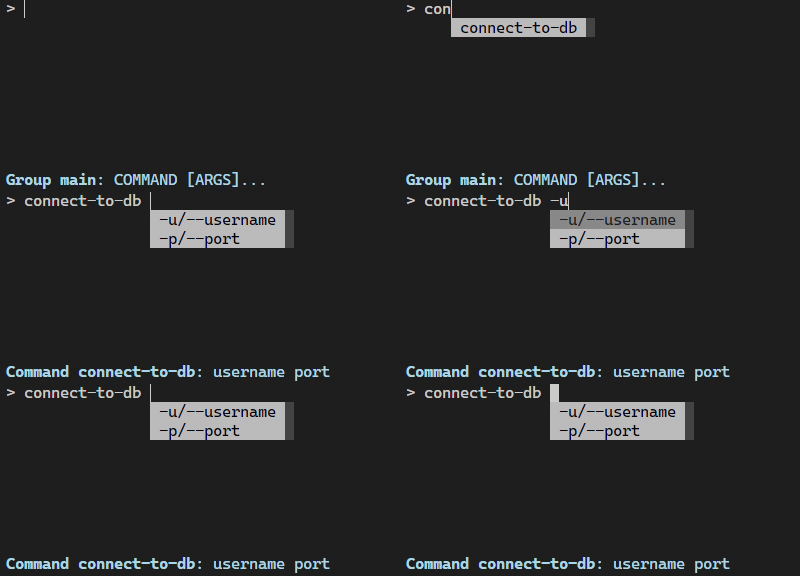
By default, ClickCompleter suggests all the option names separately. To suggest only the shortest flag
for each option, set shortest_option_names_only to True in the completer’s keyword arguments.
The flag shortest_option_names_only determines whether only the shortest name of an
option parameter should be used for auto-completion or not. It’s False by default.
With this setting, options that have more than one option name will insert only the shortest option name when the suggestion is accepted, but
their suggestions will include all of their names separated by /.
 1@click.group(invoke_without_command=True)
 2@click.pass_context
 3def main(ctx):
 4    repl(ctx, completer_kwargs={
 5        'shortest_option_names_only': True
 6    })
 7
 8@main.command()
 9@click.option('-u', '--username')
10@click.option('-p', '--port')
11def connect_to_db(username, port):
12    ...
Suggesting Only Unused Parameters#
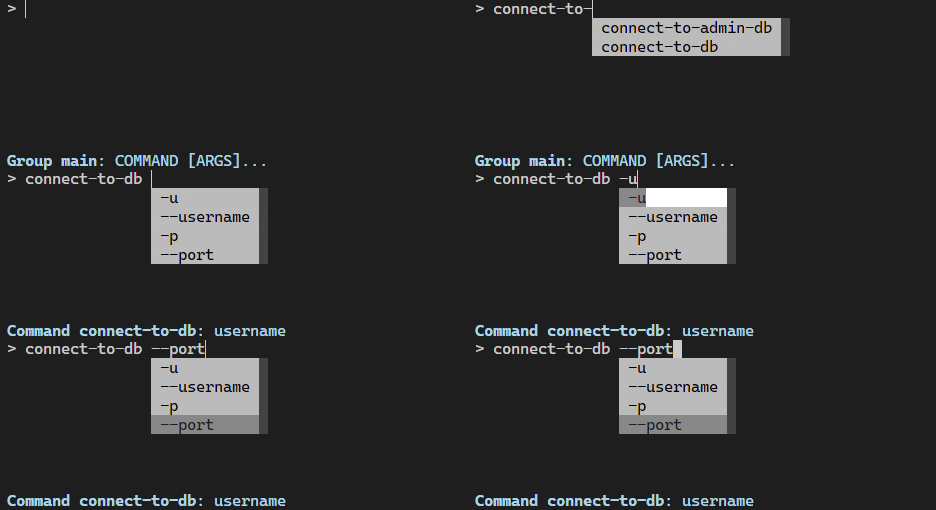
By default, click-repl suggests option names even for parameters that have already received values from the prompt. This allows the user to overwrite and provide a different value even after supplying one.
To prevent the completer from suggesting option names of such parameters, set
show_only_unused_options to True. It defaults to False.
This flag determines whether the options that have already been mentioned or used in the current prompt should be displayed for suggestion or not.
@click.group(invoke_without_command=True)
@click.pass_context
def main(ctx):
   repl(ctx, completer_kwargs={
       'show_only_unused_options': True
   })

@main.command()
@click.option('-u', '--username')
@click.option('-p', '--port')
def connect_to_db(username, port):
   ...